CUSTOM BUTTONS templates/pdf // SELECT YOUR TEMPLATE BELOW
To save a template, simply right click, and select "save target as" (on a PC) or "download linked file" (on a MAC)
How To Use The Templates
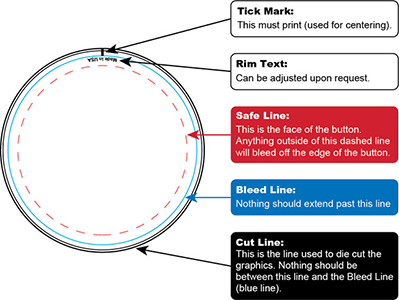
- 1. Save template to your computer (right click template size, and select "save target as").
- 2. Open the template in a graphic editing software application such as Adobe Illustrator, Adobe InDesign, or Adobe Photoshop.
- 3. Use the bleed line (blue line) to set your background color or clip your background image to the proper dimensions.
- 4. Design you art based on the template, save, and upload the file through our website order form.






ELBusa Creations™ © 2026. All rights reserved